Novalis
A native macOS app for browsing, tagging, and rating AI-generated images. Think Photos, but for what you've made.
The Problem
If you generate images with AI, you end up with thousands of files scattered across folders. The filenames are meaningless. The metadata — prompt, model, seed, sampler — is buried inside the file in a format that varies by generator. There's no good way to search, compare, or curate what you've made.
What It Does
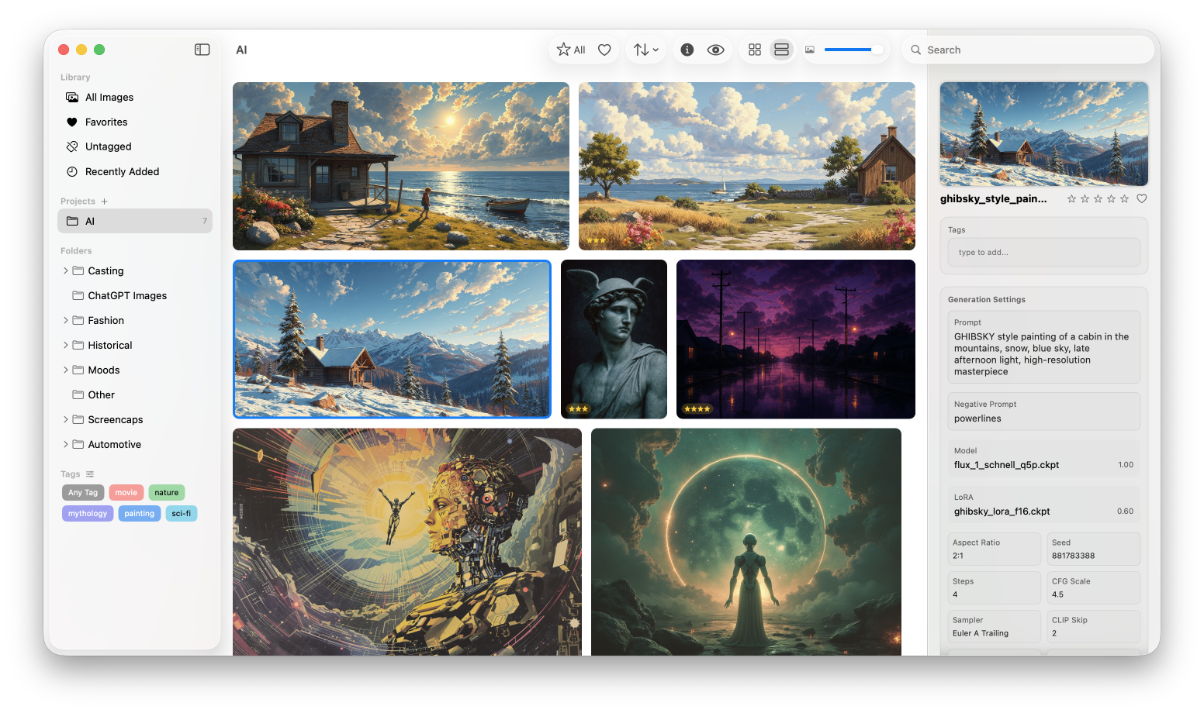
Novalis watches your folders and indexes what it finds. It reads AI metadata from PNG and JPEG files across six generator formats — Draw Things, AUTOMATIC1111, InvokeAI, ComfyUI, Fooocus, and Midjourney — and surfaces it in a searchable, filterable inspector panel.
The grid uses a justified layout that respects each image's aspect ratio. No letterboxing, no cropping. Star ratings, favorites, tags with autocomplete, and virtual projects for organizing work without moving files.
How It Stores Things
Images from watched folders stay where they are — Novalis references them in place with security-scoped bookmarks. Manually imported images get copied into the library bundle. External drives are first-class: if a drive goes offline, the metadata stays and the images relink when it comes back.
Curation Mode
A dedicated mode for working through images one at a time. Full-size preview with the inspector open for rating, tagging, and favoriting. Keyboard-driven — number keys for star ratings, F for favorite. Press Escape to drop back to the grid.
Built with AI
Like Hugin, Novalis was designed and coded entirely in collaboration with Claude. Swift 6, SwiftUI with an AppKit collection view for performance, SwiftData for persistence, and macOS 26's liquid glass design language.